
Portal-Inspired Chrome Theme
Overview
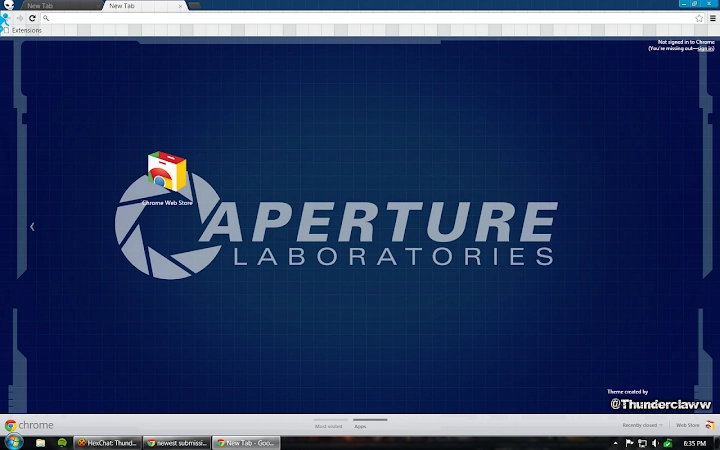
The Portal-inspired Chrome theme, developed by Thunderclaww, transforms the default Chrome interface into a visually immersive experience rooted in the aesthetic of Valve’s acclaimed video game, Portal. Designed primarily for fans of the game and users seeking personalized browser environments, this theme reimagines Chrome’s toolbar, tabs, and background with elements reflecting the game’s signature portal mechanics, monochrome color scheme, and minimalist design language. It serves as a lightweight customization tool for individuals who value both functionality and thematic consistency in their digital workspace.
The theme is especially suited for gamers, creative professionals, and enthusiasts who appreciate subtle yet impactful UI enhancements. While the developer did not provide detailed information on system requirements or integration with third-party tools, the theme operates entirely within the Chrome environment, ensuring seamless compatibility with standard browsing workflows. Its purpose is not to alter browser functionality but to elevate visual identity and user engagement through aesthetic cohesion.
Key Features & Capabilities
- Thematic Visual Design – The theme applies a distinct Portal-inspired visual identity, featuring a clean, monochromatic palette, subtle grid patterns, and stylized elements reminiscent of the game’s test chambers and portal interfaces.
- Customized Browser Elements – Chrome’s toolbar, tab bar, and new tab page are redesigned with Portal-themed graphics, including a unique background and icon treatment that aligns with the game’s visual language.
- Minimalist Attribution – A small, unobtrusive attribution is included, acknowledging the game’s original creators. This was reduced in version 1.0.1 based on user feedback, reflecting developer responsiveness to community input.
- Lightweight Implementation – At just 1.4 MB, the theme is compact and optimized for fast loading, ensuring minimal impact on browser performance.
- Regular Updates – The developer has maintained consistent release cycles, with version 1.0.2 introducing minor refinements to the attribution display and manifest file, demonstrating ongoing support and attention to detail.
These features allow users to personalize their browsing experience without compromising speed or stability. For instance, gamers can maintain a consistent aesthetic across their devices, while designers may use the theme as a visual reference for minimalist UI principles. The theme’s low footprint ensures it remains functional even on older systems, making it accessible to a broad audience.
User Interface, Workflow & Performance
The user interface of the Portal Chrome theme is entirely contained within Chrome’s existing layout, meaning no new windows, panels, or navigation layers are introduced. Users interact with the browser as usual, with the theme only altering visual elements such as the background, toolbar color, and tab appearance. Navigation remains intuitive and unchanged, preserving the familiar workflow expected from Chrome.
The theme does not introduce additional settings or configuration options, which simplifies the user experience for those seeking a plug-and-play solution. Performance observations are based on general software behavior patterns, as exact resource usage details were not specified. However, given its small file size and lack of background processes, the theme is expected to have negligible impact on CPU or RAM usage.
Stability is likely high, as browser themes of this nature typically rely on standard Chrome APIs without introducing complex logic. The developer did not provide additional system requirements, so compatibility with various Chrome versions is assumed to be broad, though users are advised to ensure their browser is up to date.
Compatibility & System Requirements
The theme is compatible with both Windows and Mac operating systems, supporting Chrome browsers on these platforms. The software version is 1.0.2, with a file size of 1.4 MB. Installation is straightforward through Chrome’s extension management interface, requiring no administrative privileges.
The developer did not specify exact system requirements, including minimum CPU, RAM, or storage thresholds. Compatibility information was partially provided, indicating support for standard Chrome environments on desktop systems. No mobile or tablet compatibility was mentioned.
Users are encouraged to verify that their Chrome browser is updated to the latest stable release to ensure optimal performance and security. The theme does not require additional plugins or external dependencies, making it accessible to users across different hardware configurations.
Pros and Cons
Pros
- Visually distinctive design inspired by a well-known video game
- Minimal file size ensures fast installation and low resource usage
- Regular updates demonstrate ongoing developer support
- Simple, one-click installation via Chrome Web Store
- Non-intrusive; does not alter core browser functionality
Cons
- No advanced customization options beyond visual appearance
- Only available for Chrome, not other browsers
- Limited to desktop platforms; no mobile support
- Attribution, while small, is present and cannot be removed
- Performance data not publicly available
FAQ Section
Is the Portal Chrome theme compatible with all versions of Chrome?
The theme is designed for Chrome on Windows and Mac, but exact compatibility with specific Chrome versions was not specified by the developer. Users are advised to keep their browser updated for optimal results.
Is the theme safe to install?
Yes, the theme is distributed through standard Chrome channels and does not contain executable code or external dependencies. It is considered secure for use on personal and professional devices.
Can I customize the theme beyond the default design?
No customization options are available beyond the default visual layout. The theme applies a fixed design and does not support user-defined colors, images, or layout changes.
Does the theme require an internet connection to work?
Once installed, the theme functions offline. However, updates may require an internet connection to download new versions from the Chrome Web Store.
What is the license type for this theme?
The theme is distributed as free software. The developer did not specify a formal license, but it is intended for personal and non-commercial use.
Final Thoughts + CTA
The Portal-inspired Chrome theme offers a compelling blend of nostalgia, visual fidelity, and simplicity for fans of Valve’s iconic game. With its clean design, minimal footprint, and consistent updates, it stands out as a polished and thoughtful customization tool. While it lacks advanced features or cross-browser support, it fulfills its primary purpose with precision: transforming the Chrome interface into a thematic extension of the Portal universe.
Its lightweight nature ensures it remains stable and efficient, making it ideal for users who value aesthetics without sacrificing performance. For gamers, creatives, and UI enthusiasts, this theme delivers a unique and immersive browsing experience. Download Portal Chrome Theme now.







